

How do I merge 2 LinkedIn accounts? Sign in to the profile you want to keep, go to Account Management inside your settings menu, and select Merge accounts. The self-service process takes about 2 to 5 minutes to submit on a desktop browser, transfers all first-degree connections within 24 to 48 hours, and permanently deletes the duplicate account.
What You Must Check Before Merging
You need access to the login credentials for both profiles before you begin. If you don’t know the password or the email address attached to the duplicate profile, the self-service tool won’t let you finish the job.
Here is what you need ready: – The email address and password for the account you want to keep. – The email address and password for the secondary account you want to close. – Access to a desktop web browser, because mobile apps on iOS and Android don’t show the account-merging setting. – A downloaded archive of your secondary profile if it contains text or media you want to save.
Tip: Download your data from the duplicate account before merging, because any articles, recommendations, or messages stored on that secondary profile will vanish permanently once the merge starts.
How do I merge 2 LinkedIn accounts Step by Step
Follow this sequence from a computer browser. You must always log into the primary account first — the one whose headline, work history, and custom URL you want to retain.
- Log in to the main account. Open a browser window and sign in using the email and password of the profile you want to keep as your permanent identity.
- Open the Settings & Privacy menu. Click the Me icon with your photo at the top right of the navigation bar, then select Settings & Privacy from the dropdown list.
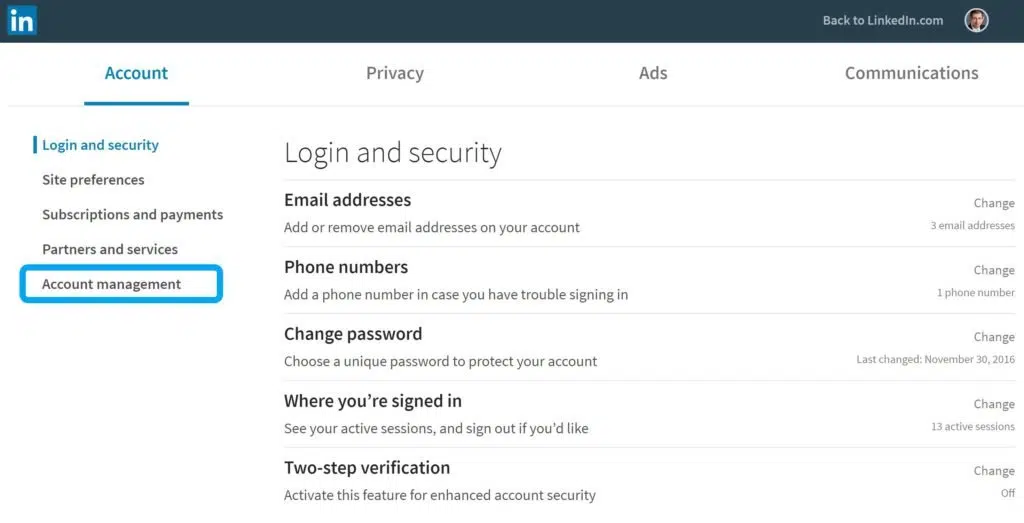
- Select Account preferences. Click the Account preferences tab from the left rail menu, then scroll down to the bottom area labeled Account management.
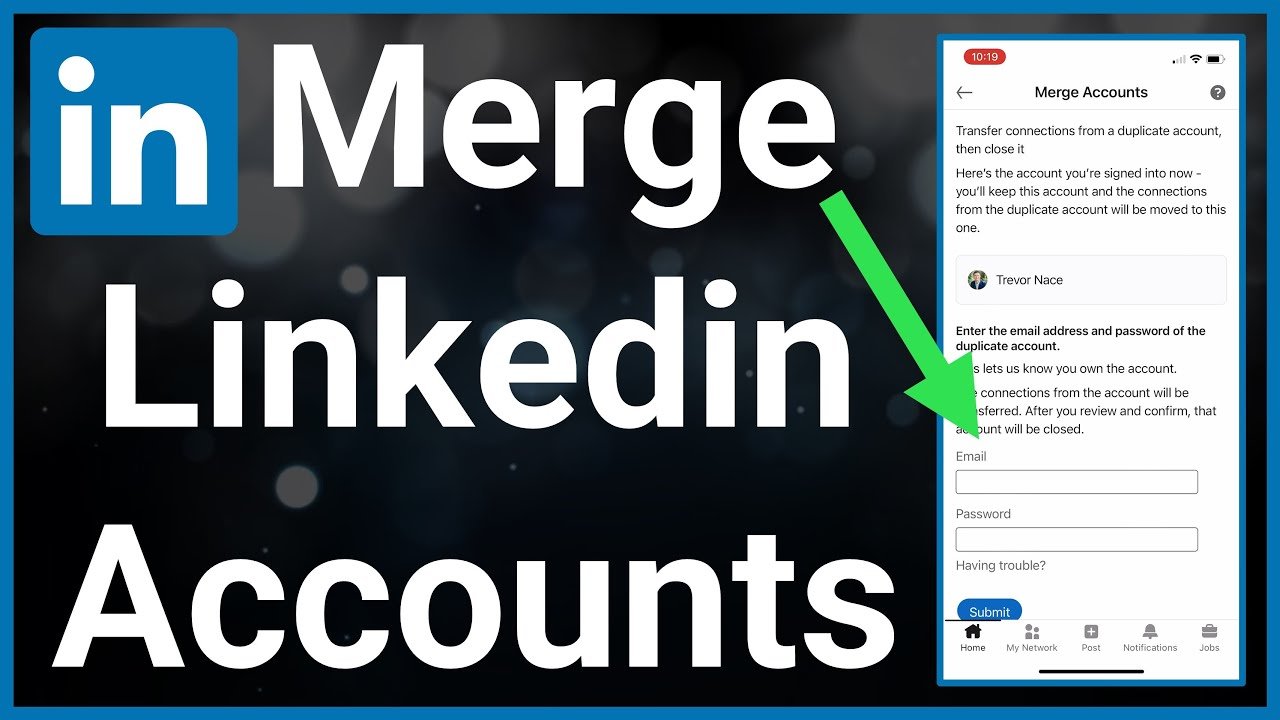
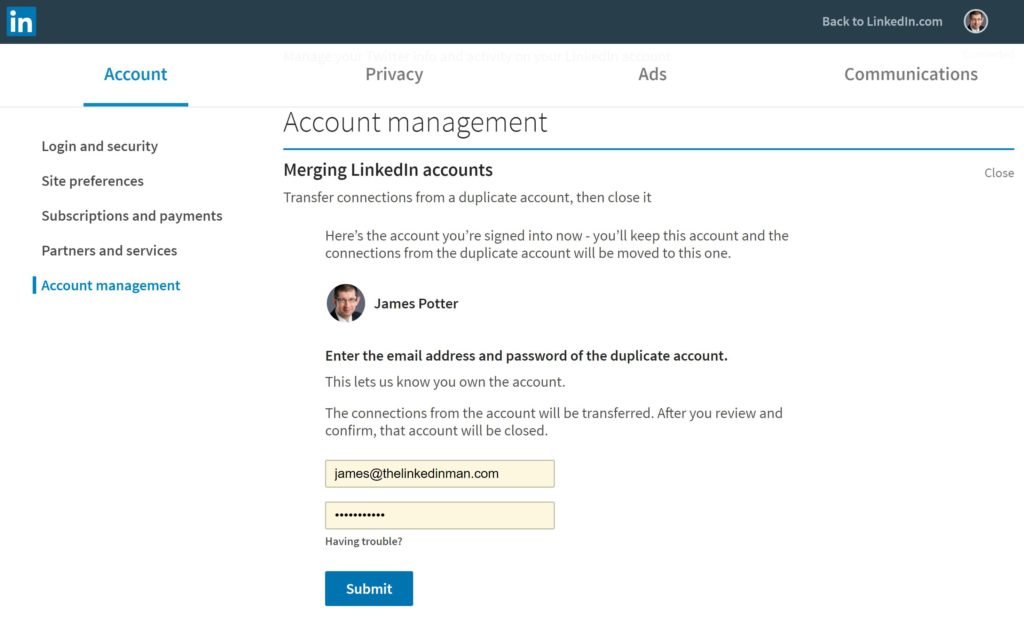
- Click Merge accounts. Find the line marked Merge accounts and click the right-facing arrow next to it to open the submission form.
- Enter the duplicate login details. Type the email address and password of the secondary profile that you want to close into the prompt fields.
- Confirm your password. Enter the password of your primary account when prompted to verify that you own both accounts.
- Submit the request. Click Submit to finish; the system then starts moving your connections over and schedules the secondary profile for permanent deletion.
What Moves Over and What Disappears: How do I merge 2 LinkedIn accounts
Merging doesn’t combine every piece of your profile. It moves your professional network while discarding the rest of the secondary account’s history.
The system transfers your confirmed connections and associates the secondary account’s primary email address with your retained profile.
| Data Type | What Happens During Merge | Time to Complete |
|---|---|---|
| First-degree connections | Transferred to primary account | 24 to 48 hours |
| Secondary email address | Added to primary account login list | Immediate |
| Work experience and bio | Dropped (retains primary only) | Immediate |
| Posts, comments, and likes | Deleted permanently | Immediate |
| Recommendations received | Deleted permanently | Immediate |
| Message threads | Deleted permanently | Immediate |
| Active Premium subscription | Must be cancelled first | User-dependent |
If the secondary profile holds recommendations you don’t want to lose, copy them by hand or ask those specific colleagues to resubmit them to your primary account once the merge finishes.
How Long Does the Merge Take to Complete?
The connection transfer takes between 24 to 48 hours to finish processing across your entire network. You’ll receive a confirmation email on your primary address right after submitting the form, but your connection count won’t update on your public page right away.
The duplicate profile disappears from public search results within a few days, though external search engines like Google or Bing can take anywhere from a few days to a couple of weeks to clear the cached duplicate listing from their index.
Is It Safe to Do This Yourself?
Yes, merging is completely safe to do yourself through official account settings, provided you follow the built-in workflow. The process doesn’t risk your primary profile’s standing, reputation, or search ranking.
If you have an active paid subscription on the duplicate account, you must manage it manually.
Handling Common Merging Problems
Merging accounts usually runs smoothly, but specific roadblocks happen when credentials are missing or accounts have conflicting subscriptions.
Why won’t the system accept my duplicate account password?
This happens when you type incorrect credentials for the second account or have two-step verification turned on. Sign out of your main profile completely, then sign in directly to the duplicate account to test your password. If it fails, use the Forgot Password link to reset it. If two-step verification is active on that secondary account, turn it off inside its privacy settings before attempting the merge again from your primary account.
Why is the Merge accounts button greyed out or missing?
The option won’t work if the secondary account manages an active LinkedIn Page or has zero connections. If you manage a Company Page or Showcase Page on the secondary account, transfer admin privileges to your primary account first, then remove yourself as an admin on the duplicate. Once those ties are cut, refresh your primary browser session and the merge button will become available.
What if I can’t access the email on the duplicate account?
If you no longer have access to the email inbox of your old account, you can’t use the automated self-service tool. You’ll need to submit an identity verification request to LinkedIn customer support. They’ll ask for an image of a government-issued photo ID (such as a passport or driver’s license) to confirm you own the duplicate profile. Once verified, support will release the account so you can close it or merge it into your main profile.
Important Trade-offs and Limits
Before you merge, weigh what you give up against what you gain. The major trade-off is the total loss of all personal content on the duplicate account in exchange for keeping your network intact. If your duplicate profile has years of published articles or rich discussions with colleagues, those items will be erased the moment the merge processes.
This process isn’t for people who want to separate their professional identities into two distinct industries. LinkedIn’s User Agreement allows only one profile per person; attempting to run two separate profiles under different email addresses violates platform terms and risks having both accounts restricted.
Keep in mind that platform limits apply to merged accounts. You can hold a maximum of 30,000 first-degree connections on a single personal profile. If combining both networks would push your total over that limit, the extra connection requests won’t convert into connections; those members will automatically become followers instead.
Related guides
Frequently Asked Questions: How do I merge 2 LinkedIn accounts
Can I merge my LinkedIn accounts using the mobile app?
No, the mobile app doesn’t include the merge feature. You must open a desktop browser or load the desktop version of the website in your mobile browser. Go to your Account preferences menu and navigate to the Account management section to find the tool.
Will people know that I merged two accounts?
No, LinkedIn doesn’t send an announcement to your network stating that you merged accounts. Connections from your duplicate profile will simply see your primary account in their connections list. If they check their messaging history, conversations they had with your duplicate account will simply show as closed.
Can I reverse an account merge if I change my mind?
No, you can’t undo a merge once it’s submitted. The secondary profile is closed immediately, and all content like posts, messages, and recommendations is erased from platform databases. Take time to download any valuable text or message histories before you confirm the merge request.
What happens if both accounts share the same connection?
The system detects the duplicate connection and merges it into one. It won’t list that person twice in your network, nor will it artificially inflate your total connection count. Your mutual connection will stay linked to your primary profile without noticing any change on their end.
Can I merge more than two accounts together?
Yes, but you can only merge two accounts at a time. If you have three accounts, merge the first duplicate into your primary profile and wait 48 hours for the process to settle. Then repeat the exact same procedure to bring the third account into your primary profile.
Do skill endorsements transfer over to my main account?
No, skill endorsements from the secondary profile are deleted during the merge. Only your raw first-degree connections and primary email address move over. If you want specific endorsements on your main profile, you’ll need colleagues to endorse the skills listed on your primary profile directly.
Sign in to your primary profile today, locate the Account Management menu, and run the self-service tool to clean up your professional identity across the platform.