

To hide your profile temporarily, open Settings & Privacy on LinkedIn, click Account preferences, scroll to Account management, and select How to Hibernate LinkedIn Account. You won’t get messages or notifications while it’s off.
Your public profile vanishes from search engines and LinkedIn searches. But any message you sent to someone else remains in their inbox, and recommendations you wrote for them stay visible on their page. If you run a Company Page as the only admin, you’ll lose access until you reactivate.
People often skip checking their active job applications before they hide everything. If you’ve applied through Easy Apply or messaged a recruiter this week, going invisible right now means they can’t find you when they review candidates. Finish your active conversations first, or switch your Open to Work setting off so recruiters don’t think you ghosted them.
Steps to pause your LinkedIn profile
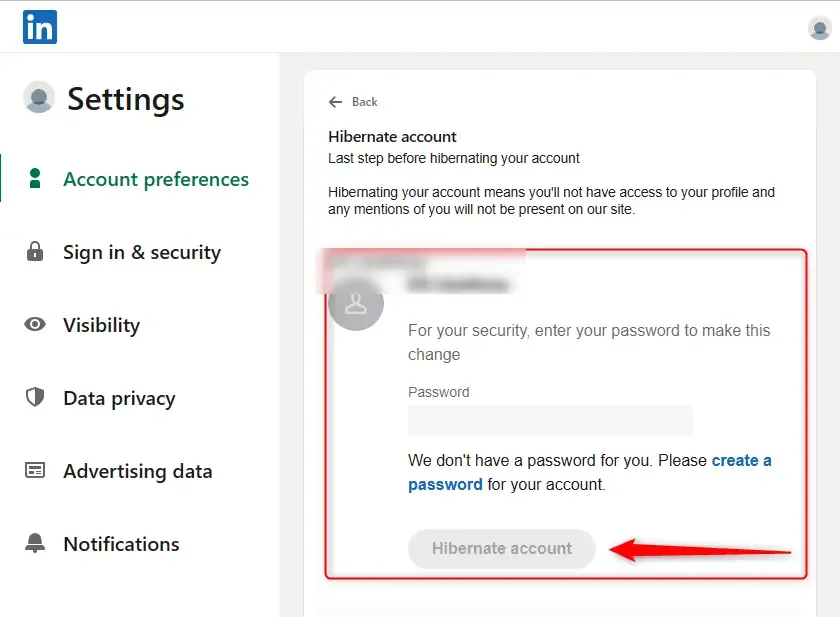
LinkedIn keeps this option tucked away inside the account settings rather than on your main profile page. You’ll need your current password, so have it ready before you start clicking. The whole process takes about two minutes on a computer or the mobile app.
- Click your profile picture in the top right corner of the LinkedIn homepage and select Settings & Privacy from the dropdown menu.
- Choose Account preferences from the left-hand menu, then scroll down past the general settings until you reach the Account management section.
- Click Hibernate account, which sits just above the option to permanently close your account.
- Pick a reason from the list provided, such as taking a break or looking for fewer emails.
- Type your current password into the box to confirm it’s really you making the change.
- Click the final Hibernate account button at the bottom of the screen to complete the process.
Tip: Don’t confuse hibernation with closing your account. Closing deletes your connections and endorsements forever, while hibernating just hides them. Read the screen carefully before you press the last button.
If you manage a Company Page and you’re its only administrator, assign another admin before you hibernate. Without a second admin, no one can post updates or reply to followers while your personal profile is hidden. Check LinkedIn’s official guide on managing Company Page admins to add someone else properly.
You don’t need to download your data first unless you want an offline backup. Hibernation doesn’t delete anything, but having a local copy of your connections never hurts. Go to Data privacy > Get a copy of your data if you’d like that archive before you disappear.
Once you click the final button, you’ll be logged out automatically. Your browser might still show cached versions of your profile for a few hours, but other users searching for you’ll see nothing. Don’t panic if you can still see yourself briefly; clear your browser cache or try searching from a private window to verify you’re truly hidden.
How long LinkedIn hibernation lasts
Hibernation doesn’t expire on its own. Your profile stays hidden indefinitely until you decide to log back in.
| Situation | How long it stays hidden | What changes it | What to watch for |
|---|---|---|---|
| Standard hibernation | Indefinitely | You logging back in | None, it just waits |
| Applied for jobs recently | Until you return | Recruiters trying to view your profile | Missed interview invitations via email |
| Running a newsletter | Paused immediately | No new issues go out | Subscribers receiving no updates |
| Premium subscription active | Hidden but billing continues | Your payment method charging monthly | Paying for features you can’t use |
Hibernating your profile doesn’t cancel a Premium billing cycle. Cancel the subscription first, wait for the billing period to end, then hibernate.
All scheduled or future newsletter issues stop sending the moment you hibernate. Subscribers won’t receive a notification; the content simply stops arriving. If you plan to be gone long, publish a final issue explaining the break.
If your profile has been hidden far longer than you intended because you forgot your login email, you’ll need to use the “Forgot password” link on the sign-in page. It works while the account is hibernated. Enter your email address, check for the reset link, and follow it to regain access.
Signs your LinkedIn account is hibernated

You’ll know it worked because trying to visit your own profile URL while logged out shows a page saying the profile isn’t available. You won’t appear in LinkedIn search results, and your connections can’t see you in their network lists. If a colleague searches your exact name, your face won’t show up.
If you’re unsure whether you actually hibernated or just closed the app, ask a trusted colleague to search for your name while you’re logged out.
The ultimate test is attempting to log in. If hibernation is active, entering your correct email and password will instantly reactivate the account and drop you onto your feed.
Errors that spoil LinkedIn hibernation

- Keeping a Premium subscription active. You’ll continue getting charged monthly while your profile is completely invisible and unusable. Cancel your Premium plan in the Account preferences section first, let the current billing cycle finish, and only then click the hibernate button.
- Leaving pending job applications unresolved. Recruiters who try to click your name from their applicant tracking system will hit a dead end, which looks like you lost interest in the role. Withdraw your applications or message the hiring manager directly before you hide your profile.
- Being the sole admin of a Company Page. Your business page loses its only manager, meaning nobody can approve follower requests, post updates, or respond to customer inquiries. Add a trusted colleague as a super admin through the page settings before you step away.
- Assuming sent messages disappear. People you’ve already messaged can still read everything you wrote to them, even though your name changes to a generic label. If you sent something sensitive thinking hibernation would erase it, you’ll need to contact LinkedIn support directly to request message removal.
- Forgetting your login email or password. Reactivation requires your exact credentials, and guessing wrong too many times locks the recovery process. Write down your primary email address and current password in a secure place before you confirm the hibernation.
Frequently asked questions: How to Hibernate LinkedIn Account
Can I hibernate LinkedIn from my phone?
Yes, you can do this entirely through the LinkedIn mobile app. Tap your profile picture in the top left corner, tap Settings at the bottom, select Account preferences, and scroll down to find Hibernate account under Account management. The screens look slightly different on iOS and Android, but the path and options are identical.
Why can’t I find the hibernate option?
LinkedIn sometimes moves menu items during app updates. If you don’t see it under Account preferences, make sure your app is updated to the latest version. Enterprise accounts managed by a company’s IT department occasionally have restrictions placed on them. If you’re on a corporate network, ask your IT administrator if they’ve disabled self-service hibernation.
How long does it take to reactivate?
Reactivation happens instantly. The moment you type your correct email and password on the login screen, your profile becomes visible again. Your connections, posts, and endorsements load immediately. You don’t need to wait 24 hours or submit a form; logging in is the only action required to bring everything back.
Is it safe to hibernate if I’m job hunting?
No, hibernating makes you invisible to recruiters searching for candidates. If you just want to stop browsing your feed but still need to be found, turn off activity broadcasts in your visibility settings instead. That way, you can quietly update your resume without announcing it, while keeping your profile searchable.
What happens to my recommendations when I hibernate?
Recommendations you received stay saved in your account database but disappear from public view. Recommendations you wrote for other people remain visible on their profiles because those belong to them now. When you log back in and reactivate, all the recommendations you received will reappear on your profile exactly as they were.
Do my connections know I hibernated?
LinkedIn doesn’t send any notifications to your network when you hibernate. However, observant connections might notice you disappearing from their feed or showing up as “LinkedIn Member” in old message threads. If you want to avoid confusion, post a brief status update mentioning you’re taking a break right before you hibernate.
Can I still use LinkedIn Learning while hibernated?
No, hibernating your main account pauses access to all connected services, including LinkedIn Learning. Any courses in progress will save your exact spot, but you won’t be able to log in to watch videos or earn certificates until you reactivate your profile. Plan to finish your current module before hiding your account.
Conclusion
Hibernating gives you a quiet exit without burning bridges or deleting years of networking. Just remember to settle your subscriptions, warn any active recruiters, and secure your login details before you press the final button. When you’re ready to return, your entire professional history will be waiting exactly where you left it.